

 book a call with us
Your smart contract mints an NFT on Polygon. The transaction confirms. Now you need to update your database, send the user a confirmation email, notify your Discord community, and trigger a treasury rebalancing workflow on Ethereum. Most developers write custom backend code for this – Node.js scripts with event listeners, database connections, API calls, error […]
Read MoreRealising a critical wallet update hours after it happens can be costly. If you’re an admin managing gas or relayer wallets, staying funded is survival. But keeping an eye on multiple wallets around the clock is impossible.
Manual tracking takes time, custom scripts often break, and even the best developers can’t react faster than an automated alert. It leads to missed transactions, failed executions, and unnecessary stress.
Kwala steps into this gap by offering no-code workflows to track wallet balances and send real-time alerts. In this blog, we’ll learn how to set it up.
Steps to Set Up Low Balance Alerts for Crypto
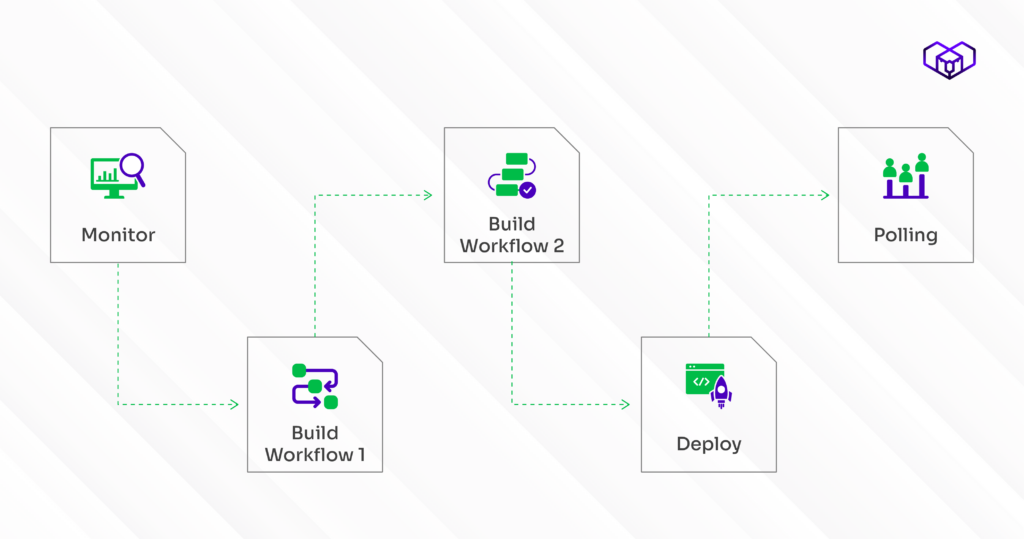
Setting up a low wallet balance alert is easier than you think. We’ve listed the entire process, that too without the need for coding or scripts.
Step 1: Creating a workflow for wallet balance monitoring alert
We’ll create a workflow to monitor your wallet balance. If it drops below a set level, it’ll trigger another workflow to send a Telegram alert. So, let’s start:
- Create a Telegram bot via BotFather.
- Write and deploy a simple smart contract on Polygon using Remix IDE and select the Solidity compiler version.
- Connect MetaMask and switch to the Polygon Testnet, and deploy the contract via the wallet.
- Select the smart contract’s event, such as a decrease in value.
Now it’s time to test your crypto wallet alert setup. Make sure you have a few POL tokens, paste your wallet address into the workflow, and run a quick check. Verify the transaction and timestamp on Polygonscan.
Step 2: Building the second workflow for crypto wallet low balance notification
The next step is to build the second workflow through Kwala, the first-ever no-code platform for Web3 automation.
- Visit Kwala’s Dashboard and log in to your account.
- Click on “New Workflow”
- Name your workflow, such as LowBalanceNotification
Step 3: Configuring the second workflow for wallet balance alert Telegram
Now that both workflows are set, it’s time to configure everything inside Kwala. It will trigger the cryptocurrency wallet balance alert the moment it drops below the set limit. For this, you’ve to:
- Set the Execution Settings to “Immediate”
- Set the date and time according to your local time zone.
- Add your smart contract details and choose Polygon Mode from the options.
- Go to your contract and copy the event you want to monitor.
- Paste it into Kwala under “Recurring Event Name”
- Enter the notification post URL where Kwala will send your Telegram alert request.
- Create a new action and name it telegram_notifier.
- Set the Action Type as “POST API CALL.”
- Under API Endpoint, paste your Telegram API URL
- Under “API Payload”, add the chat ID (either a group or channel ID) and the message content.
- Once done, click Next.
Step 4: Executing and deploying the real-time wallet balance alert workflow
Now that you’ve configured everything, it’s time to bring your workflow to life with Kwala’s no-code blockchain backend.
Let’s finish the setup:
- Under Execution Mode, choose “Sequential.” This ensures that each action runs in the exact order you’ve defined, one after another.
- Click “Create Workflow” to move ahead.
- You’ll now enter the Workflow Editor, where Kwala displays your setup in a clean YAML format.
- This editor allows you to easily fine-tune your configuration, even without prior coding experience.
- Take a moment to carefully review all the details in the YAML editor.
- Check that there are no missing fields or formatting issues, especially things like indentation or colons.
- Click “Save” to confirm your setup.
- Lastly, click on “Deploy”
Your workflow for crypto wallet balance notifications is now live.
Step 5: Creating a new workflow for polling
Powered by Kwala’s workflow engine for blockchain dev, it helps you fetch wallet details at regular time intervals, without manual tracking.
Here’s how to create one:
- Start by creating a new workflow in Kwala and name it “Polling123.”
- We’ll repeat the same basic configuration steps we used earlier.
- But this time, instead of an on-chain event, we’ll make it run at regular time intervals.
- Add Expiry details, such as date and time, and any other limits for how long you want this workflow to remain active.
- Add the interval value and time units. We’ll set it to 1 minute, so the workflow will check your wallet balance every minute.
- Add the Action details and set the Action Type to “CALL (Smart Contract).”
- Add smart contract information, and copy and paste your smart contract address and the specific function you want to call.
- Add AmoyTest wallet address here for testing purposes.
- Click Save, then Complete, and finally Deploy.
- When prompted, confirm the transfer request in your Kwala wallet.
Make your wallet talk to you, before trouble does
Even a few unnoticed seconds make all the difference when it comes to monitoring crypto wallets. One missed wallet update, one delayed notification and suddenly, your tokens tell a story you didn’t see coming.
That’s what Kwala aims to resolve. Built as a powerful Web3 developer tools backend, it converts every wallet balance change into an instant Telegram alert.
Decentralized development functions on efficiency and awareness. Kwala supports this by transforming raw blockchain activity into actionable, real-time alerts.
Keep your wallet secure, your reactions sharp, and your moves informed. Subtle balance monitoring through Kwala helps maintain clarity and wallet security without active oversight.
FAQs on low wallet balance alert
How to get wallet balance alerts with Kwala?
You can create a simple Kwala workflow that monitors your wallet in real time and triggers a Telegram notification whenever the balance falls below your selected threshold. Kwala handles the event listening and alert delivery automatically, with no infrastructure setup.
Can I use Kwala to automate alerts for any blockchain wallet?
Yes, Kwala supports multiple chains and wallet formats, allowing you to set up balance alerts across different networks. Whether you manage EVM wallets, multi-chain treasuries, or user-specific accounts, Kwala can monitor them and deliver consistent cross-chain notifications.
Do I need coding or backend setup to get started?
No, Kwala’s no-code builder lets you configure balance triggers and Telegram actions directly in the interface. Since the platform manages execution and event monitoring, you don’t need servers, scripts, polling code, or backend infrastructure of any kind.