
 book a call with us
You know that moment when you’re refreshing a blockchain explorer and look away for just one minute? That’s usually when the block you’ve been waiting for gets mined. It often leads to missed rewards, failed bids, or poorly timed actions. That’s the reality of Web3, where everything happens instantly on-chain with zero patience for human timing. Tracking block numbers manually, checking explorers, or […]
Read MoreEvery Web3 developer knows this pattern: you launch a contract, test it, feel good about it… and then the backend work begins. Suddenly you’re maintaining RPC listeners, cron jobs, relayers, indexers, retry queues; all before you even build your actual product logic.
Multiply this across chains, and backend complexity becomes the reason simple ideas take weeks to ship.
All the backend work you usually build? Kwala removes it.
Instead of writing and maintaining infrastructure, you express your backend as workflows that react to monitoring on-chain events. You get to build backendless dApps that scale across chains using pure logic, not servers.
Below is a leaner explanation of why this matters, and a more detailed breakdown of how to do it in Kwala.
Why multi-chain development breaks teams (and how automation changes it)
Most teams don’t struggle with smart contracts; they struggle with the invisible machinery around them. A multi-chain app requires:
- Knowing when something happened on Chain A
- Reacting on Chain B
- Reconciling data across them
- Keeping this machinery reliable
This is why multi-chain workflow automation is critical. Kwala gives you a workflow engine that streams blocks, extracts events, and executes your logic; without you ever writing backend code.
Templates help too. With curated Web3 backend templates, you start closer to production instead of rebuilding orchestration patterns every time.
A Better Way to Handle Multi-Chain Backend Complexity
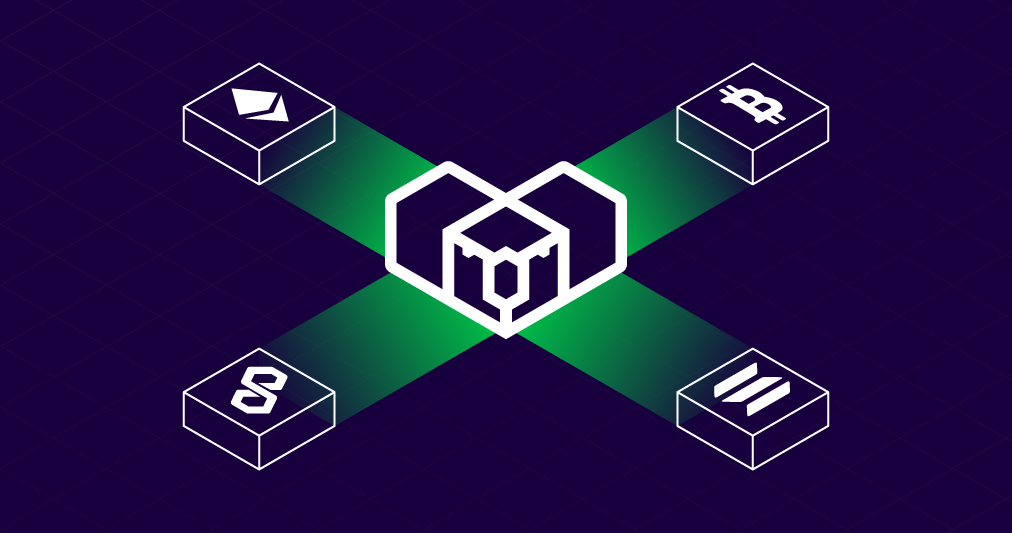
When a dApp operates across multiple chains, its backend must track events on each network, coordinate actions between them, and keep everything aligned. That’s where most of the complexity, and most delays come from. Traditional setups require separate listeners, relayers, and custom logic for every chain involved.
Kwala changes this model by turning those on-chain events into automated workflows.
Instead of wiring infrastructure to react to each chain separately, you define the logic once, and Kwala executes it wherever it needs to run. This makes cross-chain behavior consistent, reliable, and far easier to scale.
How to build and deploy a multi-chain dApp using Kwala
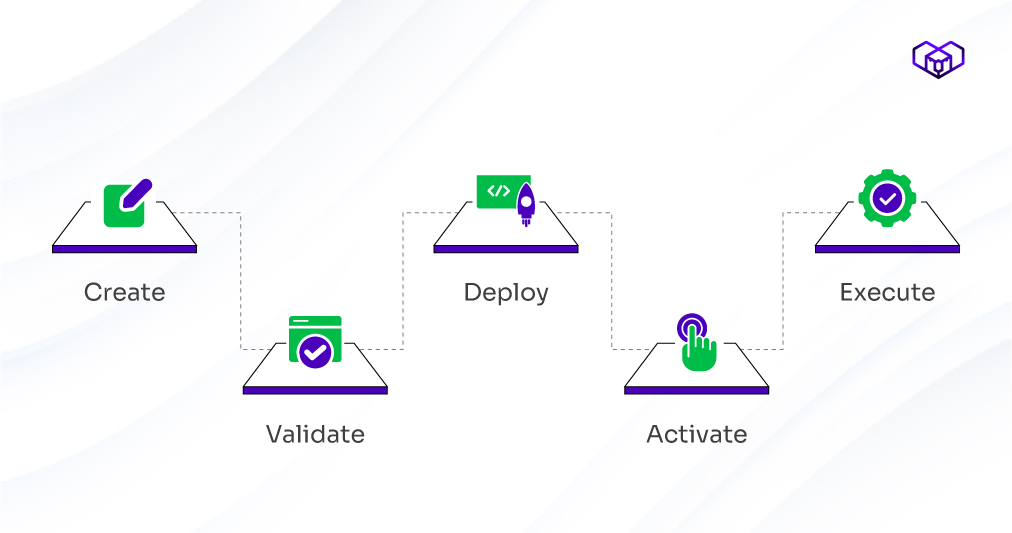
The following steps outline the core workflow developers rely on when building multi-chain applications with Kwala.
Step 1: Define your event-to-action logic (your dApp’s backbone)
Start with clarity: determine which on-chain events drive your logic and what actions they should initiate.
For example:
- “When a user stakes on Base → mint/update an NFT on Polygon.”
- “When a DAO proposal passes → post updates to an off-chain API.”
This mapping is important because Kwala is built around monitoring on-chain events. Your entire backend is essentially:
Event → Trigger → Action
Step 2: Set up your Kwala workspace
Once inside Kwala:
- Connect your MetaMask wallet.
- Access your workspace where all workflows live.
- Top up credits if required (Kwala charges only when workflows execute).
This replaces servers, schedulers, relayers, and indexers: everything starts here.
Step 3: Create your workflow and choose the trigger
This is where backend complexity collapses into a few clean decisions:
- Click New Workflow.
- Give it a name (e.g., RewardsIntentListener).
- Choose your trigger type:
- Immediate
- Time Stamp
- Event
- Oracle Price
- Block number
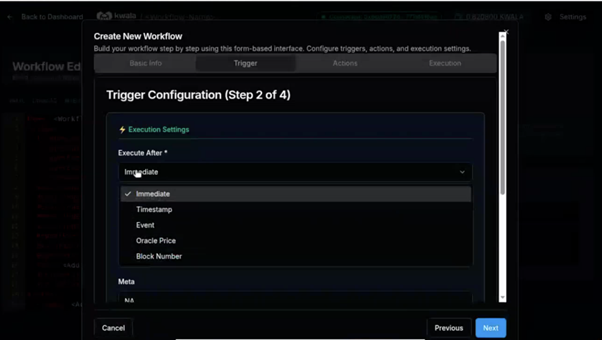
Note: For the first iteration of your workflow, use an on-chain event as the trigger.
4. Select your Trigger Source Contact and Chain ID
- Paste the contract address
- Kwala automatically retrieves ABIs from verified contracts, with an option for developers to supply the contract’s source code themselves.
- Choose the specific event to listen for
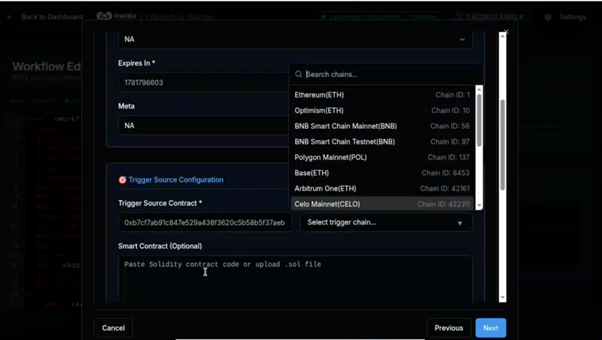
Behind the scenes, Kwala begins handling your block streaming, event extraction, validation, and indexing.
You don’t write any of this.
Step 4: Configure dynamic inputs
Most multi-chain dApps rely on event parameters to execute actions.
For example:
- Wallet address
- Token ID
- Metadata
- Amount
Kwala supports this through parameter extraction using either:
- ABI-driven parameter extraction, or
- Lightweight reg-ex that parses event logs
Once mapped, these dynamic values flow into your next chain’s contract, your API, or your off-chain system. This step replaces the parsing/indexing code developers normally spend days writing.
Step 5: Add your actions (cross-chain or off-chain)
This is where you define what should happen next.
A workflow can include actions such as:
- Call a smart contract function
- Trigger a contract on another chain
- Hit a REST API
- Send notifications
- Fan-out multiple actions in parallel
Often, a Chain 1 event routes straight into a Chain 2 action within the same workflow.
However, for multi-chain apps, a commonly seen pattern is:
Workflow A (Chain 1 event) → Workflow B (Chain 2 action)
Regardless of how it’s triggered, the workflow runs in a familiar sequence:
- You define the function you want to call
- Map the dynamic parameters
- Choose sequential or parallel execution
- Ensure your contract permit logic allows Kwala to call it
This is where Web3 backend templates help: you can start from a pattern instead of designing everything yourself.
Step 6: Validate, deploy, and activate
This is a 3-phase process that makes your backend real:
1. Save: Kwala validates your YAML logic and runs syntax checks.
2. Deploy: Kwala registers the workflow in the network.
3. Activate: Your workflow gets live.
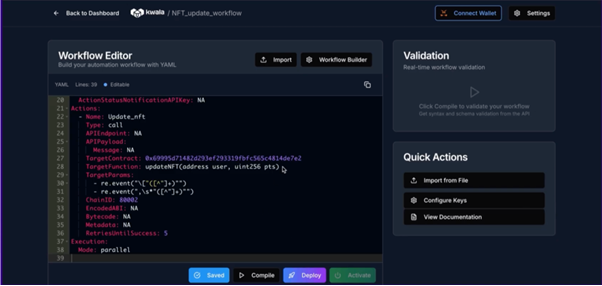
Kwala begins monitoring on-chain events and executing your actions the moment triggers occur.
You have officially deployed a backend, without building a backend.
Step 7: Extend to more chains or use cases
This is the beauty of the approach:
- To add another chain → duplicate the workflow, change the chain ID
- To add another use case → start from an existing template
- To add off-chain logic → plug into any REST endpoint
Why this model works long-term
By converting blockchain events into programmable workflows, you get:
- Faster go-to-market
- Lower backend costs
- Cleaner architecture
- Easier enterprise integration
- No dependency on centralized RPC providers
- Peace of mind around reliability
More importantly: you spend time building features, not plumbing.
That’s the promise of multi-chain workflow automation: simple, declarative backend logic that works across chains without servers.
With Web3 backend templates and continuous monitoring on-chain events, Kwala supports this approach end to end, enabling developers to ship multi-chain dApps with far less effort.
FAQs on multi-chain workflow automation
1. Can enterprises migrate existing automation to Kwala?
Yes, existing backend tasks can be recreated as workflows, mapped to contract events, or connected through APIs, reducing infrastructure while maintaining operational consistency.
2. What types of smart contracts work best with Kwala?
Any contract emitting events works seamlessly. As long as event structures are clear, Kwala can extract values and trigger workflows for DeFi, NFTs, gaming, or governance.
3. Do I need separate servers for each chain?
No, Kwala’s orchestration layer handles cross-chain triggers and actions without requiring individual backend environments.